Beat Scheduling
AIBA does not schedule itself. You wire it to your operating system's scheduler — cron on Linux, crontab or launchd on macOS, Task Scheduler on Windows. The scheduler polls beat run --all on a fixed cadence, and AIBA fires whatever is due.
The Scheduling Model
OS Scheduler (cron / launchd / Task Scheduler)
        │
        │  Every 5 minutes:
        │  uv run python main.py beat run --all
        ▼
    AIBA checks each beat:
    • Cron expression vs last_run → is it due?
    • Yes → fire agent, log, email
    • No  → skip
The OS scheduler is the trigger. AIBA is the executor. They're decoupled — you can change beats without touching cron, and you can change the polling cadence without touching beats.yaml.
Linux (cron)
Open your crontab:
Paste the line from beat schedule at the end:
Every 5 minutes, cron runs the command. Output is appended to logs/cron.log.
macOS
Option A: Crontab (simplest)
Same as Linux:
Option B: launchd
Create ~/Library/LaunchAgents/com.aiba.beats.plist with a StartInterval of 300 seconds. The beat schedule command prints the full plist structure for your working directory.
Windows (Task Scheduler)
- Open Task Scheduler
- Create Basic Task → Trigger: Daily, repeat every 5 minutes
- Action: Start a program
- Program:
uv - Arguments:
run python main.py beat run --all - Start in:
C:\path\to\AIBA
What Polling Interval to Use
5 minutes is the sweet spot. Short enough that beats fire close to their scheduled time, long enough that cron isn't hammering the process. The overhead of beat run --all is near-zero when no beats are due — it loads the YAML, checks cron expressions, and exits.
Verifying Beats Are Running
Check the rolling summary
2026-06-28 09:00 | daily_hackernews_summary | ✓ $0.12 | Top HackerNews AI posts from the last 24 hours...
2026-06-28 09:05 | daily_hackernews_summary | ○ $0.00 | Not due yet. Last run: 2026-06-28T09:00:00
One line per run. Quick scan tells you what fired, what skipped, and what it cost.
Check per-beat logs
Each beat gets its own directory with structured JSON logs:
logs/
├── beat_summary.md
├── cron.log
└── daily_hackernews_summary/
    ├── 2026-06-28T090000.json
    └── 2026-06-28T170000.json
Each JSON file contains the full run record: status, output summary, duration, cost, tool calls, and errors.
Email Notifications
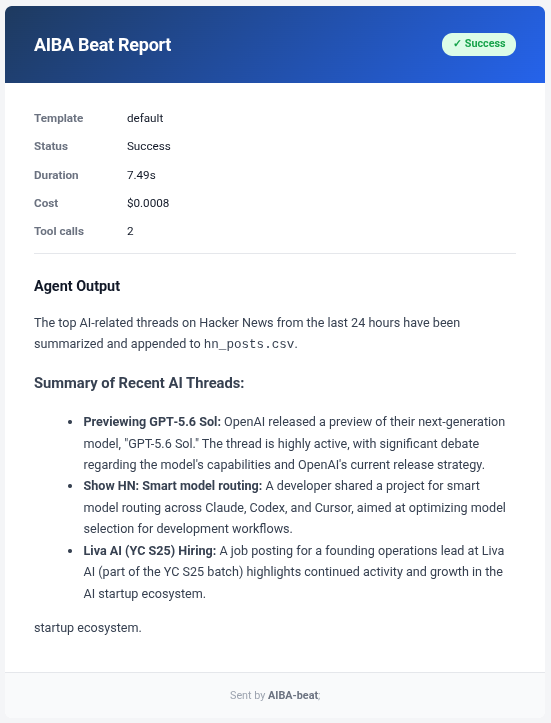
If a beat has notify_email set and SMTP is configured in your environment, AIBA sends an HTML email after each run.
What it looks like
What's in it
| Section | Content |
|---|---|
| Header | Beat name + status badge (✓ Success / ✗ Error / ⚠ Skipped) |
| Metadata | Template used, status, duration, cost, tool call count |
| Errors | If any — listed in red bullet points below metadata |
| Output | The agent's markdown output converted to HTML |
How to set it up
Set notify_email on a beat and configure these environment variables:
export SMTP_HOST=smtp.gmail.com
export SMTP_PORT=587
export SMTP_USER=your@email.com
export SMTP_PASSWORD=your-app-password
export SENDER_EMAIL=your@email.com
The beat must also have a notify_email field (can differ from the sender address).